Check Results
Body
Prerequisites
- The student must have enrolled into the system.
- The student must have registered into the system and the courses.
Steps.
- Type https://myportal.busitema.ac.ug on your Google chrome.
- Enter the student number and the password you normally use when opening your portal.
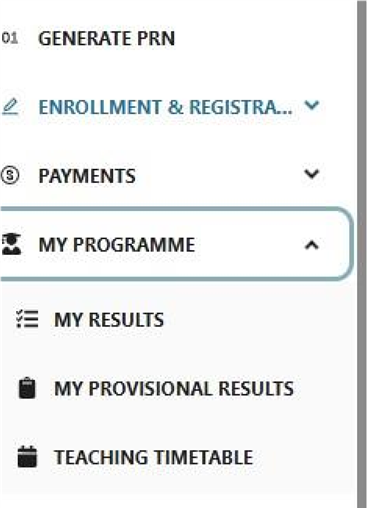
- Click menu and you will see a least of words.
- Select my program, you will see different options in case the results are uploaded in my results or provisional results you will be able to see that on your page.
- In case you don’t access them reach out to your Faculty Academic Registrar.
 MISSION: “TO PROVIDE HIGH STANDARD ICT SOLUTIONS FOR TEACHING, LEARNING AND RESEARCH FOR A TRANSFORMATIVE SOCIETY”.